[멋사 AI 7기] 절약
 Saving
오늘의 키워드 : 절약
현업에서 다루는 데이터는 실습에서 다루는 데이터보다 대부분 큰 용량
이 때 컴퓨터 RAM 용량만큼 불러올 수 있음
더 많은 데이터를 불러와서 분석하거나 모델을 만들기 위해서는 메모리를 효율적으로 사용할 수 있어야 함
 절약하는 방법
- 메모리 절약 => downcast
절약을 통해 더 많은 데이터를 불러와서 더 많이 분석할 수 있을지?
- 스토리지(디스크공간) 절약 => parquet
파일 크기를 줄여서 더 많은 파일을 저장할 수 있을까?
메모리 절약 by downcast
데이터의 범위(int64, uint32 등)에 따라 메모리에서 차지하는 용량이 다르다.
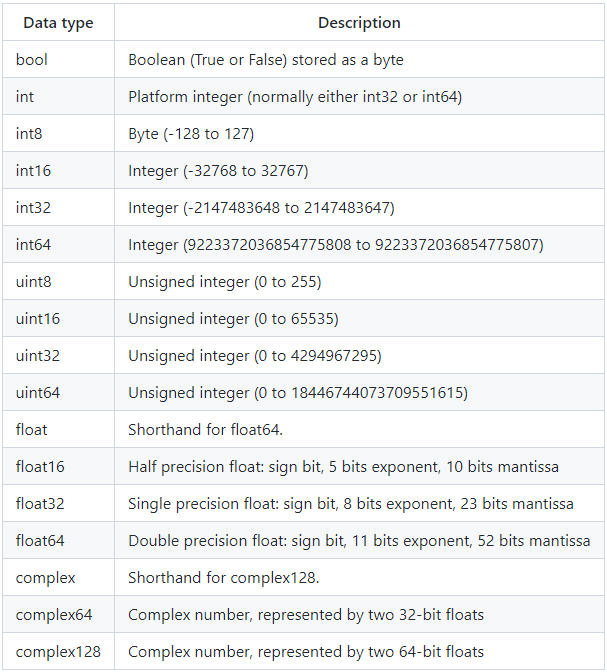
downcast 는 pd.to_numeric 을 사용한다.
downcast : {‘integer’, ‘signed’, ‘unsigned’, ‘float’}, default None
If not None, and if the data has been successfully cast to a
numerical dtype (or if the data was numeric to begin with),
downcast that resulting data to the smallest numerical dtype
possible according to the following rules:
- ‘integer’ or ‘signed’: smallest signed int dtype (min.: np.int8)
- ‘unsigned’: smallest unsigned int dtype (min.: np.uint8)
- ‘float’: smallest float dtype (min.: np.float32)
- int
음수가 없을 때 unsigned
음수가 있을 때 signed = integer
- float => float - 소수점이나, 결측치 고려
-
bool => int8 - 거의 차이 없음
- object
범주형 형태일 때 => df.astype(“category”)
게시글 내용처럼 범주의 수가 너무 많다면 적합하지 않다.
스토리지 절약 - 파일 크기 줄이기 by parquet
csv : 행단위 vs parquet : 열단위
열 단위 구분이 압축에 유리하다.
 pyarrow 와 fastparquet 도 설치한다.
engine 에서 쓰이기 때문
pandas.DataFrame.to_parquet
engine : {‘auto’, ‘pyarrow’, ‘fastparquet’}, default ‘auto’ Parquet library to use.
If ‘auto’, then the option io.parquet.engine is used.
The default io.parquet.engine behavior is to try ‘pyarrow’,
falling back to ‘fastparquet’ if ‘pyarrow’ is unavailable.
compression : {‘snappy’, ‘gzip’, ‘brotli’, None}, default ‘snappy’
Name of the compression to use. Use None for no compression.
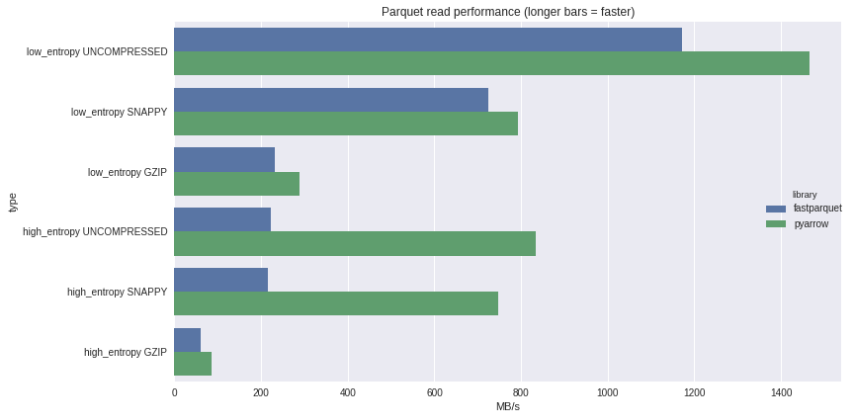
parquet 파일은 메타 정보를 포함하고 있다.
=> 데이터 수가 적을 때에는 오히려 csv 보다 파일 크기가 클 수 있다.
파일 크기 비교
이 모듈은 운영 체제 종속 기능을 사용하는 이식성 있는 방법을 제공합니다.
os.stat(path, *, dir_fd=None, follow_symlinks=True)
파일 또는 파일 기술자의 상태를 가져옵니다.
주어진 경로에 대해 stat() 시스템 호출과 같은 작업을 수행합니다.
stat_result 객체를 반환합니다.
- st_size
일반 파일 또는 심볼릭 링크면, 바이트 단위의 파일의 크기.
심볼릭 링크의 크기는 포함하고 있는 경로명의 길이이며, 끝나는 널 바이트는 포함하지 않습니다.
os.path : 일반적인 경로명 조작
- os.path.isfile(path)
path가 존재하는 일반 파일이면 True를 반환합니다.
대시보드
streamlit
A faster way to build and share data apps
오늘의 이모저모
PySpark Koalas
- Migrating from Koalas to pandas API on Spark — PySpark documentation
- 10 minutes to Koalas — Koalas 1.8.2 documentation
- Migrating from Koalas to pandas API on Spark — PySpark 3.2.1 documentation
-
pandas 코드로 대규모 클러스터에서 더 빠르게 빅데이터를 분석 해보자 - Koalas - 박현우 - PyCon Korea 2020 - YouTube
리눅스 계열 명령어
ls : 현재 디렉토리 폴더 내부 확인 (윈도우는 dir)
cd : Change 디렉토리, 현재 디렉토리 위치에 존재하거나 상위 다른 디렉토리로 이동
- ~ : root 디렉토리 이동
- .. : 상위 디렉토리 이동
mkdir dirName : 현재 디렉토리 위치에서 새로운 디렉토리를 생성
mv 디렉토리 혹은 파일 이동경로 : 현재 디렉토리 내 디렉토리 또는 파일 이동
mv 디렉토리 혹은 파일 newName : 현재 디렉토리 내 디렉토리 또는 파일 이름 변경
cp 현재파일명 복사할파일명 : 현재 디렉토리 내 파일 복사
cp -R dir/ : 현재 디렉토리 내 디렉토리 복사
rm fileName : 현재 디렉토리 내 파일 삭제
rm -rf : 현재 디렉토리 내 디렉토리 삭제
 출처
출처
- Data typehttps://github.com/rougier/numpy-tutorial#quick-references
- pd.to_numeric
https://pandas.pydata.org/docs/reference/api/pandas.to_numeric.html
- pandas.DataFrame.to_parquet
https://builtin.com/data-science/numpy-random-seed
- Parquet read performance
https://wesmckinney.com/blog/python-parquet-update/
- os
https://docs.python.org/ko/3/library/os.html#module-os
- streamlit
https://streamlit.io/
- PySpark Koalas
https://spark.apache.org/docs/latest/api/python/migration_guide/koalas_to_pyspark.html#
https://koalas.readthedocs.io/en/latest/getting_started/10min.html
https://spark.apache.org/docs/latest/api/python/migration_guide/koalas_to_pyspark.html#
https://www.youtube.com/watch?v=Y9kdUq_qIa8
 포스팅 공지
작성한 포스팅은 멋쟁이 사자처럼 AI SCHOOl의 수업 내용입니다.
댓글남기기